
How can we create a discount coupon by amount using Pasos??Updated 4 months ago
How can we create a discount coupon by amount using Pasos??
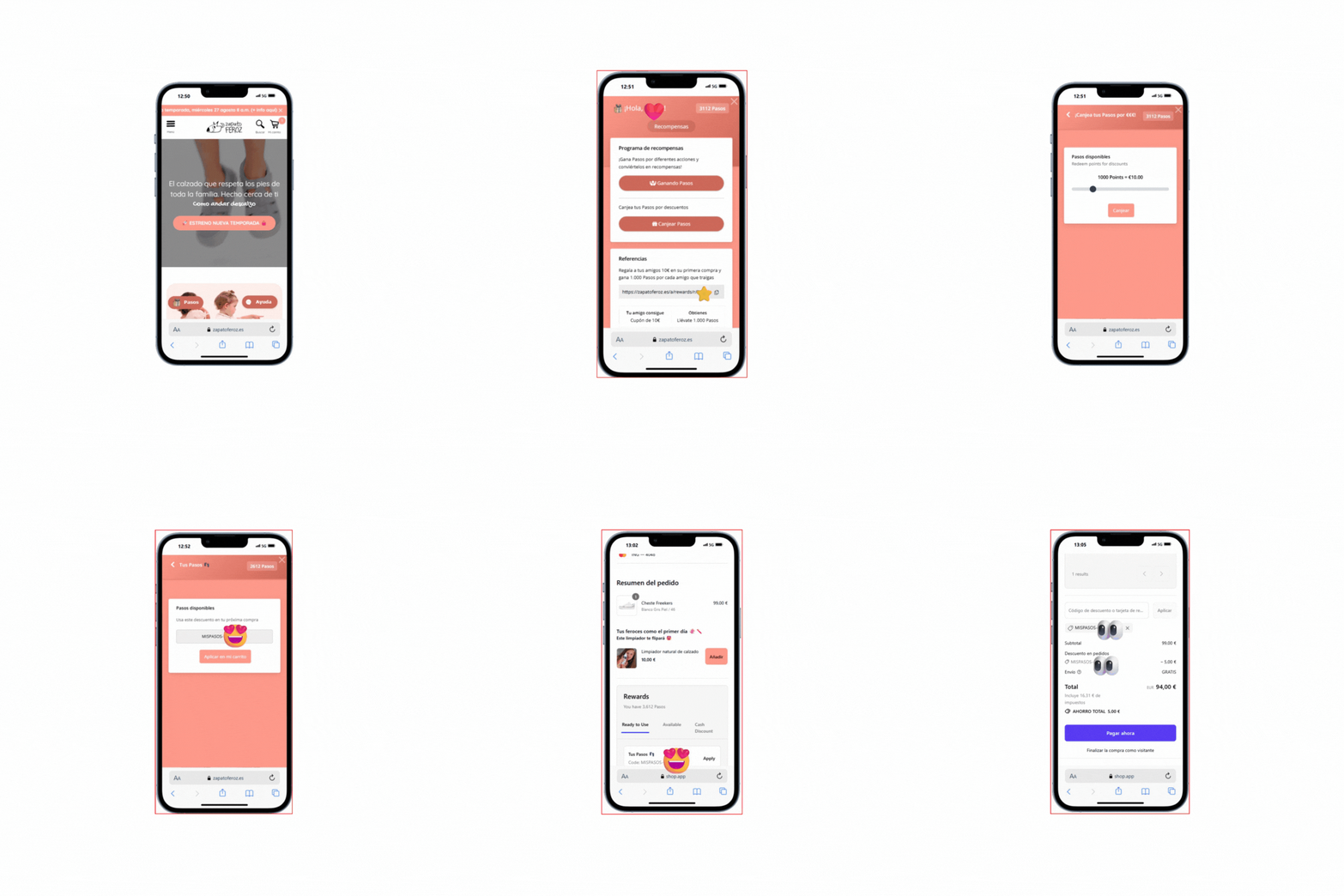
First, let’s generate the Coupon: 🎁
- Go to the website and log in with your email address. 📧
- Find and click on the little gift icon 🎁 (the Pasos program).
- Once on your personal Pasos page, click the “Redeem Pasos” button.
- On the next screen, click “Redeem” again.
- Move the slider to select how many Pasos you want to spend and the discount amount you want to get.
(Remember: minimum €5, maximum €50, and your order must be at least €20). 💰 - Click “Redeem”. That’s it! Your coupon has been created. ✨
Now, let’s apply the Coupon in the Cart: 🛒
- Go to your Shopping Cart 🛒 with the products you want.
- Click “Checkout”.
- Scroll down almost to the bottom of the page.
- In the “Ready to Use” section, select the coupon you just generated and click APPLY.
- You’ll see the final price update automatically! 🎉
Here’s a gif showing the step-by-step process if you’d like to take a look:
Now all that’s left is to complete your payment and wait for your Feroces. Enjoy! 🤗